Remote Work in Remote Places
A loop around America. The office in the trunk. The desk under the trees.
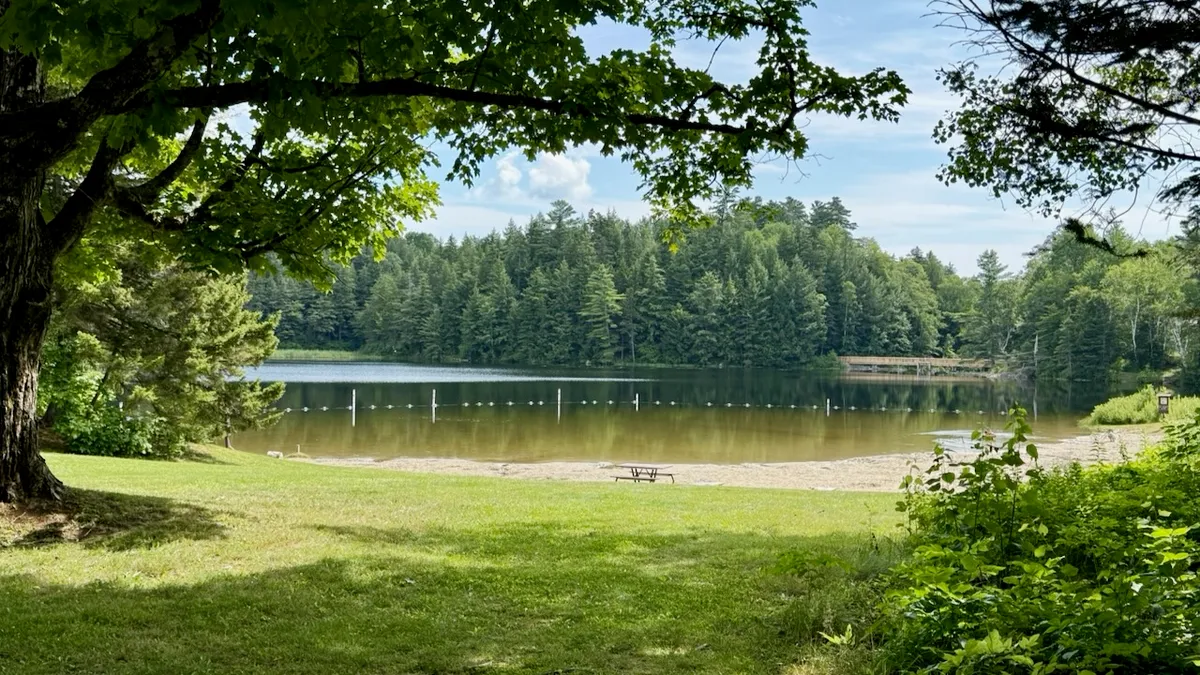
Nearly three months camping our way across the US, mostly in national and state park campgrounds, while I kept working full days for my company. Here's the route, and the setup that solved it problem by problem: connectivity, failover, cabling, power, storage and somewhere to actually stand and work.
Nearly three months ago we pulled out of Boulder, Colorado with no itinerary beyond a rough loop east and a list of national parks. Most nights since were spent in national and state park campgrounds, with a hotel here and there when it made sense. And the whole time, between the driving and the hiking, I ran a full workday out of a Rivian.
Not “checking email from a hammock” remote work. Actual work: code, reviews, writing, the boring parts.
The reason is simple. A vacation is two weeks and then you go home. What I wanted was the other thing: to work a normal week from the remote and genuinely beautiful parts of this country, so a trip can run three months instead of two, because it doesn’t need to be time off.
That turned out to be six separate problems wearing a trenchcoat: connectivity, failover, cabling, power, storage, and somewhere to actually stand and work. Each one has an answer, and those answers are most of this post.
The route
It’s a loop: out of Boulder, south to New Mexico, east across Texas and the deep south, up the Appalachians to Maine, back west along the Great Lakes and home across South Dakota. 46 stops between the two Boulders, some for a week and some for a lunch.
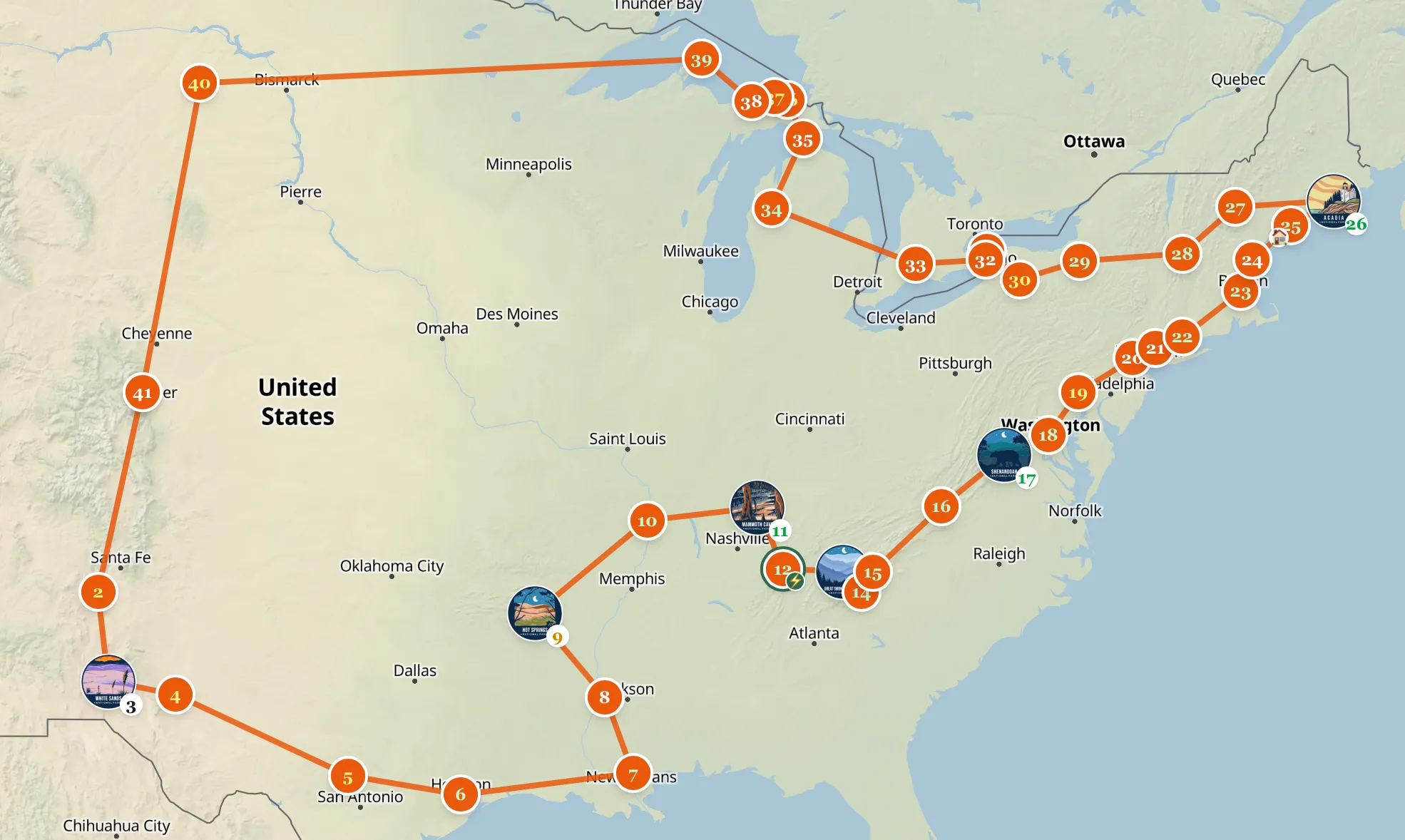
That map is the plan from before we left. The last leg changed on the road: we came home through Duluth, Sioux Falls, Badlands and Wind Cave instead of North Dakota.
Nine national parks are the spine: White Sands, Carlsbad Caverns, Hot Springs, Mammoth Cave, Great Smoky Mountains, Shenandoah, Acadia, Badlands and Wind Cave. Around those, ten state parks, which is where we spent most nights, and the detours: Houston for the Space Center, Niagara Falls, Mount Washington. Every stop in order is public on Roadbook.
Planning it in Roadbook
The plan was looser than that list makes it look. It started as a national parks route I found and liked, then collected barnacles: state parks, points of interest from Outside magazine, places friends insisted we couldn’t drive past.
Roadbook is what turned that pile into something drivable. It’s an EV road trip planner. Full disclosure, it’s ours, so weigh the recommendation accordingly, and yes, this trip was the test case.
Getting from one charger to the next is a solved problem. The Rivian’s own navigation and A Better Route Planner both do it well. What I couldn’t find was a tool for the level above that: the whole loop, in order, with the nights, the places to sleep and the days I had to work. That is what I used Roadbook for.
- Stops in order, with nights. Every stop carries a number of nights. Shenandoah and the Smokies got five, Mammoth Cave, Fall Creek Falls and Letchworth got four. Pass-through stops like Portsmouth, Mackinaw City and Cheyenne got zero. Change one number and every date after it moves.
- Lodging on the stop. Campground, hotel or farm stay, with check-in and check-out dates, so the plan and the bookings live in one place.
- Charging per stop. Each lodging records whether there is a charger. Most of the campgrounds had none: the Smokies, Acadia and Gorges all meant arriving with a full battery. Knowing that ahead of time turns “fill up before you go in” into a plan instead of a surprise.
The pattern that made it work: drive on the days with no calls, stay put on the days with them. The nights column is where that lives. The long stays are the workdays. At Shenandoah I was too busy with work to drive anywhere. At Letchworth a rainy day turned into a day in a coffee shop. New Haven was a work stop and nothing else. Trying to cover distance and hold a workday on the same day is the one combination that reliably ruins both.
How the workday actually runs
Worth saying plainly, because it changes what the setup has to survive: there aren’t many calls. The day is code, reviews, writing and Slack threads. Async by default, which is how I’d work from an office anyway.
That matters more than any single piece of hardware here. A day of writing tolerates a link that wobbles for thirty seconds; a day of back-to-back video calls does not. If your job is six hours of meetings, be honest with yourself before you buy any of this, because no amount of gear turns a marginal uplink into a good one.
The calls that do happen are Slack, Teams or Zoom, so they ride the same data link as everything else. Nothing depends on having a cell signal.
Time zones turned out to be a non-issue too. Mountain to Eastern is two hours, but you never take them both at once: one hour somewhere in Texas, the second one weeks later. At this pace each shift is a single hour you absorb over a few days without really noticing.
Connectivity: two uplinks, because one is never enough
The problem: the places worth camping in are the places nobody has run a cable to. No wifi, no ethernet, and frequently no bars either.
The answer is not one connection, it’s two, on completely different infrastructure:
- Starlink Roam for the main link, which is the plan you want if the dish moves. It held up well in most places, and where it didn’t I was very glad to have the second one. I started on unlimited and didn’t need it: 100 to 300 GB a month covers a full working month comfortably.
- A GL.iNet Mudi 7 (GL-E5800) as the cellular side. It’s purely the 5G router: SIM and eSIM, so it can run two mobile networks at once and not care which carrier gave up on this particular valley. (That link is my referral code, it gets you 10% off.)
It can run two. I ran one, and that’s the part of this setup I’d do differently.
The single SIM is a T-Mobile plan with 50 GB of high-speed data, which sounds like an absurd amount right up until the month when Starlink wasn’t reliable and cellular quietly became the primary link. I burned through the lot faster than I would have believed. Video calls are not the problem. It’s the backups, the syncs, the package installs, everything a working day does in the background without asking.
The second SIM never happened, and not for lack of trying. AT&T made getting an
eSIM near impossible at the exact moment I wanted one. The virtual eSIM
providers are excellent and I use Airalo constantly
(code PATRIC510 gets you $3 off), but read the fine print before you lean on
one as a work uplink: they throttle hard after 3 to 5 GB a day. Fine for a phone
abroad, not fine as the thing your job runs on.
For the Mudi’s eSIM slot, Simsima is an eSIM provider that pairs well with the router.
Rule of thumb: Starlink wants open sky, and trees are the enemy. Every hour under them is an hour on cellular, and cellular has a ceiling.
Obstruction isn’t binary. A “mostly clear” view through moving branches still means a link that drops in and out, which matters far more on a call than in a download. So I pick the campsite for the sky first and the view second, or plan to run the day on cellular.
The best thing I added for this trip is an external 5G antenna. The internal antennas in any travel router are a compromise, and this one lives inside a car, which is a metal box doing its level best to be a Faraday cage. A 7 dBi magnetic-mount antenna on the roof, SMA or TS9 into the router, and the cellular side goes from marginal to usable. It costs less than a nice dinner.
The Mudi’s own wifi stays off almost always, but it has two other tricks. The one I actually use: it can connect to Starlink over wifi, for when the dish has to sit off in the one patch of clear sky and I don’t want to run a cable across a road. It can also repeat a campground’s wifi, which sounds great until you measure campground wifi.
The thing I wish I’d bought before we left: a hard case with a tripod stand for the dish. The Starlink Mini is more delicate than I gave it credit for, and mine has picked up a few scratches. Getting the dish up off the ground and aimed properly is far easier on legs than on terrain, and a bit of height buys you sky you otherwise don’t have.
Failover: what happens when one of them dies
The problem: two uplinks are only useful if switching between them is automatic. Doing it by hand means noticing mid-sentence, crawling into the trunk and swapping a cable while someone waits on the call. This is the part that decides whether a dropped uplink is a shrug or a lost hour.
Everything meets at a Firewalla Gold SE. I wanted the SE because it takes two WAN inputs: Starlink into one, the Mudi into the other, and it fails over on its own when the primary drops. Whichever link I’ve declared primary that day, the other one is sitting there warm. I never swap a cable or reconnect to a different SSID mid-call. There’s nothing for me to do at all.
Behind the Firewalla sits a GL.iNet Slate 7 (GL-BE3600) doing nothing but wifi. Splitting those jobs keeps it simple: uplinks on one side, routing and filtering in the middle, one clean SSID on the other. Every device sees exactly one network, regardless of what’s happening upstream.
The Firewalla also filters ads and trackers for every device on the network, which on a metered connection is worth more than it sounds: the junk that never loads doesn’t come out of your data plan.
Cable management: wire what you can
The problem: put four boxes each broadcasting their own wifi inside a space the size of a bathroom and you will spend an afternoon debugging something that isn’t your code. And loose cables in a moving vehicle become a knot with a deadline.
So the Slate is the only access point anything connects to, and the Mudi’s radio stays off. The one exception is Starlink’s own wifi, which I leave running on purpose: it’s the path the Mudi uses to repeat the dish from a distance, and how I connect from the iPhone for the daily alignment check. Two minutes every morning beats discovering the problem during a call.
Everything else is wired. Flat CAT8 patch cables in a few lengths: a short run from Starlink into WAN 1 on the Firewalla, another from the Mudi into WAN 2, one down to the Slate, and one long enough to reach the desk outside under the awning. Velcro ties, labeled ends, the whole loom in one pouch.
Is CAT8 overkill for a satellite link that will never saturate a gigabit? Completely. I bought it because these cables get coiled, stepped on, rained on and yanked out in a hurry, and I’d rather over-spec the one part of the chain that’s easy to get right. Get the flat ones: round CAT8 fights you every time you route it under a seat or through a door seal, while the flat ones lie down, coil small, and don’t mind a closed tailgate.
Pro-tip: label both ends of every cable the day you buy them. Future you, crouched in a footwell before a call, will be grateful.
Power management: the battery matters more than the laptop
The problem: there’s no outlet. Not that any of it draws much: Starlink, the Mudi, the Slate and the Firewalla together run at under 30 W. But they run all day, every day, and the laptops, the phones and a fridge want feeding on top of that.
- A 2 kWh EcoFlow Delta 3 Max Plus that runs the networking gear and keeps every device charged through the day.
- The Rivian itself, which is the quiet superpower of working out of an EV. A car-sized battery with household sockets on it means the question is never “will I have power”, it’s “how far do I want to drive afterwards”.
The reason this works is boring and physical: it all lives in the trunk. The Delta fits neatly down the left-hand side, right next to the Rivian’s AC outlet, and everything else plugs into the Delta. The power system lives in one corner of the trunk: no cables snaking through the cabin, nothing to rearrange when we want to drive, every outlet at tailgate height.
The port count is the underrated part. Three USB-C and four AC means the permanent residents (the Firewalla, the Slate, the Mudi) stay plugged in and never move, with sockets still free for laptops and camera batteries: a phone charger never means daisy-chaining a power strip or unplugging the firewall to make room.
A charge lasts about two days, run from 90% down to 10%. Filling it back up is roughly two hours off the Rivian’s outlet, or the solar panels when the sun and the site cooperate, or a campsite outlet where there is one. Whichever is available that day.
I’d use the car less if I could. Its DC-to-AC conversion is wasteful enough that you notice: it draws far more out of the car’s battery than the Delta ends up storing. Solar and campground sockets are the better deal when they’re on offer, and the car is what covers the days they aren’t. Either way I expected to be rationing and never was. The constraint is always connectivity, or how far away the next charger is, never watt-hours.
Storage: everything has a home
The problem: a car that is also an office fills up fast, and the expensive fragile things are exactly the ones that end up loose in a footwell.
The trunk layout does most of the work. Beside the Delta there’s just enough room to stow the Starlink dish and the antennas when they’re packed away. The fragile things get a home instead of a corner to slide around in. The rest is held together with IRV Labs MOLLE panels in the R1S windows, which keep the small gear and the cables in check. Best of all, the whole rig comes out in a few minutes whenever we stop at a hotel.
Next to all of it sits an EcoFlow Glacier fridge, which is either the least necessary item in the car or the most, depending on whether you’ve just finished a workday in the heat. There’s a decent argument that the best thing about having 2 kWh in the trunk has nothing to do with uptime.
Workspace: the greenest office you’ll ever have
The problem: connectivity and power get you a laptop that works. They don’t get you somewhere to use it for eight hours without wrecking your back.
The gear stays in the car, we don’t. The router, the firewall and the battery live in the back, and the desk goes up outside, under the trees, in the green. That’s the point of doing any of this. If the plan were to sit in a vehicle all day staring at a screen, I could do that in a parking lot in Boulder.
- A portable folding sit-stand desk that goes from packed to working in under a minute, no assembly, height adjustable, and it tilts. It’s the difference between an eight-hour day and an eight-hour day you feel afterwards.
- A hammock for the breaks, and the Kammok Crosswing awning over the whole operation.
The awning has turned out to be one of the biggest wins of the entire setup, because it’s up in twenty seconds. Not “twenty seconds once you’ve practiced”. A thing that takes twenty seconds gets used; a thing that takes ten minutes gets talked about.
Shade was the reason I bought it, and shade is not a luxury when your screen and your laptop’s thermal budget are both losing a fight with the sun. But rain cover turns out to be the better feature: rain is what normally ends an outdoor workday and sends you back into the car, which is exactly the outcome this setup exists to avoid. It cuts the wind too, which is the one I’d underrated.
Some days the office was nothing more than this. Desk up under the awning, right next to the car, cable run back to the trunk.
What still doesn’t work
The posts about this life tend to skip this part, so:
- Heat. We get to stand in the shade, the gear doesn’t. A parked car in summer is an oven, and a router or a battery baking in the back is a worse problem than a warm human. Park in shade, crack the tailgate, or move.
- Setup and teardown tax. A few minutes each way, every day. Small enough to ignore until it’s raining and you have a call, and it’s the argument for staying put rather than moving every night.
- Dead zones are real. Some of the best parts of these parks have neither clear sky nor signal. That’s a calendar problem, not a gear problem: those are the afternoons to be underground in a cave and unreachable on purpose.
- Bandwidth is fine, latency is the thing. Nobody notices a slow file upload. Everybody notices you stuttering on a call. Optimize for the stable link, not the fast one.
Nearly three months on, it holds
I didn’t expect this to be the calmest three months of work I’ve had in years, but that’s how it turned out. Standing at a desk under the awning, cables tucked away, a bluff forest instead of a beige office. Being in nature the entire time was something I didn’t know I was missing.
Nearly three months across the country is enough weather and enough terrain to turn this from a demonstration into a setup: heat, rain, wind, tree cover, dead zones, campgrounds with power and campgrounds with nothing. Nothing in the list above is theoretical, and nothing needed replacing halfway through. The work didn’t suffer and neither did the places, and I’d do this full time without changing much. Once a workday reliably survives being outdoors and away from a wall socket, a trip stops being something you save vacation days for and starts being a question of where you feel like waking up next.
More on the individual stops to come. If you’re running a mobile setup of your own, or thinking about it, reach out. I’m always happy to compare notes. :)